
Online Time Clock MTS Weblog
A weblog from the authors of Online Time Clock MTS, the cost effective online time and attendance software solution
January 01, 2021
Shift Differentials Added
We've just added the ability to apply an hourly differential to employees assigned to a shift. Click here to read the full details.
Posted by markn at 9:27 PM
May 12, 2018
Login Fixes Posted
We've just posted up some minor fixes to the login creation process. The first allowed more than one account administrator login to be created. The second allowed location administrators to reset the password of the account administrator login. Both issues have now been resolved.
Posted by markn at 9:57 AM
April 19, 2018
Permanently Deleting Employees
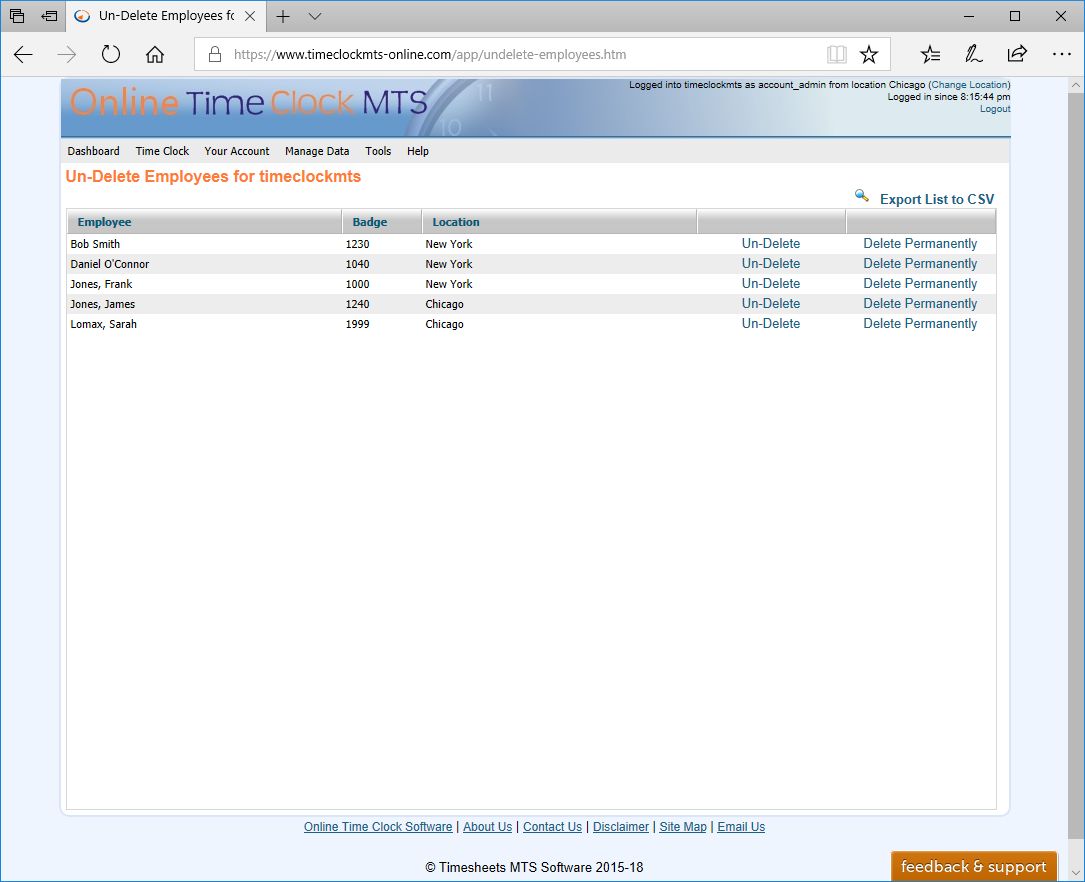
The Un-Delete Employees Screen - Click to Enlarge
We've just added the ability to delete employees permanently from the Un-Delete Employees screen (see above). To delete an employee and all their time clock data they must first be deleted on the Manage Employees screen. Once deleted the employee will appear on the Un-Delete Employees screen. To permanently delete the employee click the Delete Permanently link next to the employee's name. This action will require two confirmations before the actual data deletion occurs.
Once deleted permanently the employee's data CANNOT BE RECOVERED.
Posted by markn at 3:10 PM
April 11, 2018
Disable GPS / GeoLocation on a Single Device
We've just added the ability to turn off GPS tracking on a single device. This is useful if there's some problem with the GeoLocation/GPS sub-systems on your device and Online Time Clock MTS cannot obtain a GPS location. Turning off GPS tracking on a single device can only be done from that device, can only be done by your account administrator, and only applies to the Desktop Interface of Online Time Clock MTS.
Read the help topic entry about disabling GPS tracking on a single device here.
Posted by markn at 10:49 AM
March 26, 2018
Time Punch Logging
Today sees the addition of time punch logging to Online Time Clock MTS. To see what this is, how to enable it, and why it might be useful please see the Time Punch Logging Help Topic.
Posted by markn at 12:37 PM
March 23, 2018
Downtime 26 March 2018 - 6:30PM Pacific Time
Online Time Clock MTS will be unavailable for 1 hour at 6.30PM Pacific Time while we roll out a small update. The update adds time punch logging and a new report to display the log of changes to time punches.
Posted by markn at 10:30 AM
March 17, 2018
GPS Location and GeoFences Launched
Today sees a major update to Online Time Clock MTS. The most visible changes to the system are the addition of GPS Location and GeoFencing.
GPS Location
A new setting has been added on the Tools->Time Clock Options->Display and Report Settings screen called Record GPS Position with Time Punches. When checked the GPS Position of all time punches created on the timeclock screen, the Edit Times screen, and via the mobile interface will be recorded. Obviously if the punch is recorded from a mobile device (like a cell phone or tablet) with built in GPS this location is going to be quite accurate.
If the time punch is recorded from a device without a built in GPS (say from a desktop computer or an older tablet) then GeoLocation is used to approximate the location of the device, accuracy of this can range from excellent to abysmal.
The GPS location of recorded time punches can be viewed on the new Time Punch Map which can be accessed via the Tools->Time Punch Map menu. This will allow you to view the time punches for an employee over any date range plotted out onto a map.
GeoFencing
GeoFencing in Online Time Clock MTS allows you define geographic regions where your employees can punch in and out from. GeoFences (or fences) are defined by drawing shapes on a map. Fences can be specific to a time clock Location or global to your time clock account and are managed from the new Manage Fences screen available as usual from the Manage Data parent menu.
Fences and the Desktop Site
Fences can be applied to time clock user security logins to control the geographic location employees can punch in and out from using the Online Time Clock MTS Desktop Site. Given that the GPS accuracy of desktop computers can be patchy its likely that you'll have to define a large GeoFence to make things reliable. However this can still be useful especially when combined with Computer IP Address restrictions (see the Login Access Control help topic here).
Fences are assigned to Time Clock User Security Logins using the Manage Data->Manage Logins screen.
Fences and the Mobile Device Site
If your employees are using the Mobile Device Interface you can control where employees can punch in and out from on an employee by employee basis. Given that the accuracy of built in GPS systems in most cell phones and tablets is excellent you can probably define smaller Fences with more confidence.
Fences are assigned to Employees using the Manage Data->Manage Employees screen.
Other Changes
We've made many other changes to the system, some visible, some not. You'll notice that window positioning is more consistent, data lists are styled differently and sized more regularly, and that the time clock screen is a bit larger and more clearly laid out. What you won't notice is a total clean up of the backend data structures, a re-factoring of most of the client / server data communications, and updating of backend database code to with a more modern and reliable API.
This has been nearly 9 months in the making and we hope you're as excited about it as we are!
Posted by markn at 3:29 PM
March 15, 2018
Downtime Saturday 17 March 2018 - 6:30PM Pacific Time
We will be rolling out the Geolocation / GeoFencing upgrades to Online Time Clock MTS this Saturday, 17 March 2018 at 6.30PM Pacific Time. Online Time Clock MTS will be unavailable for 2-3 hours while we roll out the upgrades and do some final testing. Apologies for any inconvenience this might cause.
Posted by markn at 8:44 AM
March 1, 2018
Downtime Sunday 4 March 2018 - 6:30PM PST
As part of the upcoming Geolocation / GeoFencing upgrades Online Time Clock MTS will be unavailable for approximately 1 hour at 6:30PM PST this Sunday, 4 March 2018. Apologies for any inconvenience this might cause.
Posted by markn at 2:37 PM
February 27, 2018
GeoLocation and GeoFencing
We're entering the last stages of testing of a major update to Online Time Clock MTS. This will add the ability to geolocate (via GPS or network address) your employees when they punch in or out. Time Clock administrators can then view the geographic location of time punches on a map. Here's what that's going to look like;

Geofencing
The account administrator or location administrators will be able to define geographic fences and then assign them to time clock security logins. Once assigned to a login employees will only be able to punch in or out while they are within the assign geofence(s). Here's a couple of screenshots giving you an idea of how that's going to work:
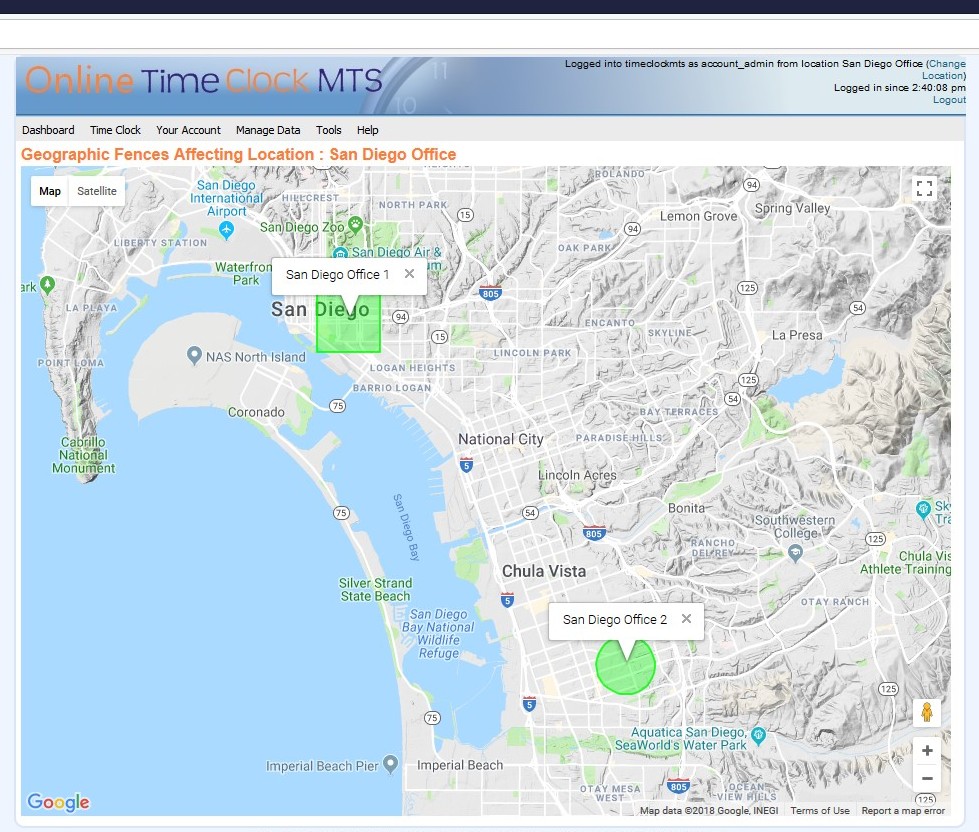

These changes will be rolled out in a couple of weeks. There will be a short amount of server downtime this Sunday night (PST) in preparation for this rollout. The exact time will be posted later this week.
Posted by markn at 1:21 PM
November 16, 2015
Mobile Device Interface Launched!
After quite a bit of effort we've launched the Mobile Device Interface of Online Time Clock MTS today. This new set of screens is designed to be used by employees who need to punch in and out using a mobile device such as a smartphone, tablet, or cellphone. Each employee must be set up to access the Mobile Device Interface and once they have they can punch themselves in or out, view their own time card, or view a history of their own time punches.
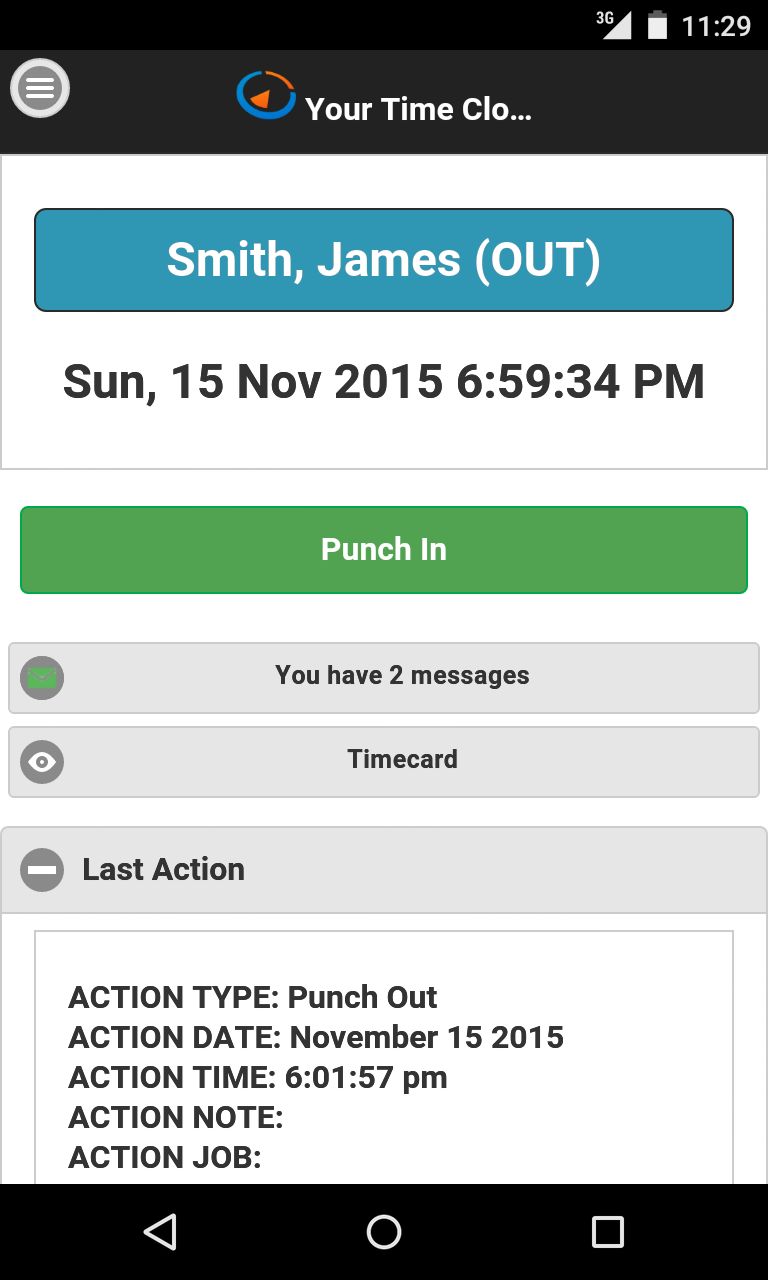
If you allow your employees to use the mobile interface each will have their own separate log in (their email address) and password. Once they are logged in they can only view their own time card information and punch themselves in or out. This is different to the desktop interface of Online Time Clock MTS which allows groups of employees to use the same login to punch in and out from a common time clock screen.
The mobile interface still allows you to track and record employee notes and time spent working on jobs. It doesn't require the employee to enter their PIN when punch in or out, and it also doesn't subject employees to IP Address access restrictions. Longer term we'll be adding geographical access restrictions to employees who use the mobile interface as well as logging latitude and longitude so you can see where they've been punching in and out from.
Other Changes
There have been a raft of other changes made to the system today. These have included various tweaks, updating of a lot of the back-end database code for improved performance, and some fixes to problems with the messaging system that were only seen on Internet Explorer. You'll also note that various reports might have the letter M in brackets after time punches ((M)) which indicates that time punch was made from the mobile interface.
Posted by markn at 11:56 AM
